
Every remote connection you’ll ever open, in one application
One secure workspace for 150+ protocols — free for individual IT pros.
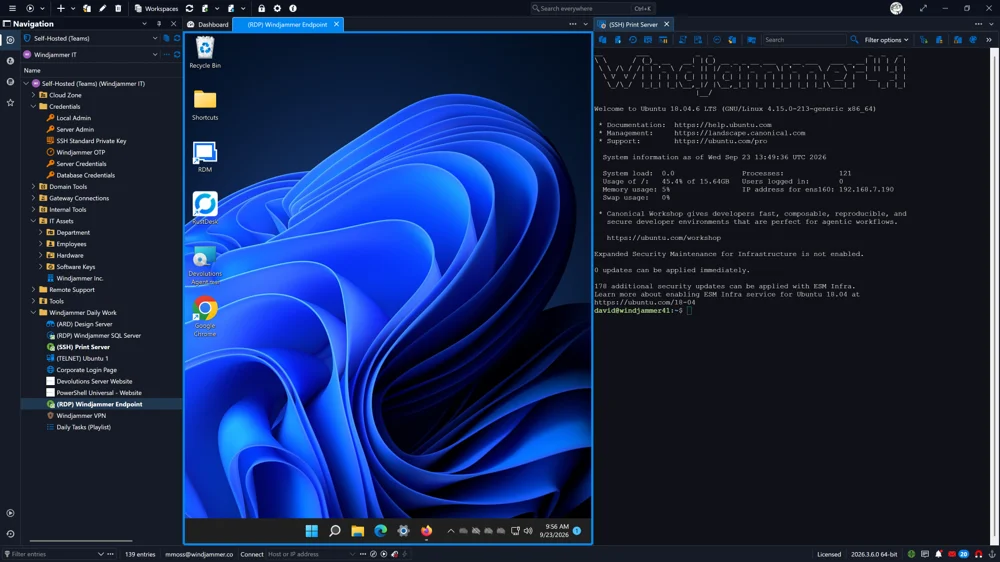
All the IT pieces, finally together
Connections, credentials, secrets, and audit trails — in a single place, with nothing extra to set up.
Trusted, rated and certified

AICPA SOC 4 
ISO 27001 
Capterra 4.6 
Software Advice 4.6 
GetApp 2025 
Info-Tech Champion 2025 
High Achiever · Winter 
Top Performer · Winter
Fifteen capabilities, one installation
Everything below ships with Remote Desktop Manager — no companion products to buy, no plug-ins to hunt down.
150+ protocols, one workspace
RDP, SSH, VNC, Telnet, VPN, web and cloud consoles side by side. One app covers every remote technology in your stack.
One-click launch with credential injection
Sessions open already authenticated. No passwords typed, pasted, or visible to the user.
Quick connect from the address bar
Enter a host name or IP and go. Ad-hoc RDP, VNC or web sessions without creating an entry first.
Multi-monitor & tabbed sessions
Consolidate connections into a single window and arrange them the way you actually work.
Built-in file transfer
FTP, FTPS and SFTP support included, alongside your remote sessions.
Centralized password vault
Usernames, credentials, privileged accounts, documents, license keys and files, protected by encryption in one shared vault.
Bring your own password manager
Integrates with KeePass, Bitwarden, 1Password, Keeper, Dashlane, LastPass, Zoho Vault, RoboForm and many more.
Private user vaults
Each user gets a personal vault that only they can open, keeping private credentials out of unsecured tools.
Account brokering
Shared admin accounts are brokered to users at launch. Plain-text credentials never reach the endpoint, so they can’t leak.
Role-based access control
Granular, inheritable permissions decide who can view, edit or manage every entry and privileged account.
Two-factor authentication
2FA options integrated directly in the software: Devolutions Password Manager, Duo, Google Authenticator, YubiKey, AuthAnvil.
Secure offline mode
An encrypted offline copy keeps credentials and sessions available without connectivity; RDM switches automatically when a connection fails.
Free mobile apps
iOS and Android apps launch connections in a tap, retrieve passwords, and approve access requests from anywhere — offline included.
Audit trail & activity logs
Every privileged operation recorded: who did what, where and when. Export to CSV or schedule reports via command line and Windows Task Scheduler.
Real-time connection monitoring
See who is connected right now across RDP, TeamViewer, embedded PuTTY and more; get alerted when a session is already open; review failed login attempts on a dashboard.
Start free today. Scale when you’re ready.
A million IT pros run their daily remote work on RDM. Download the Free edition and be connected in minutes — same app, same data when you later link a shared vault for your team. No reinstall, no migration, no catch.
Free for individual use, including commercial · 14-day trial for team editions